Overview
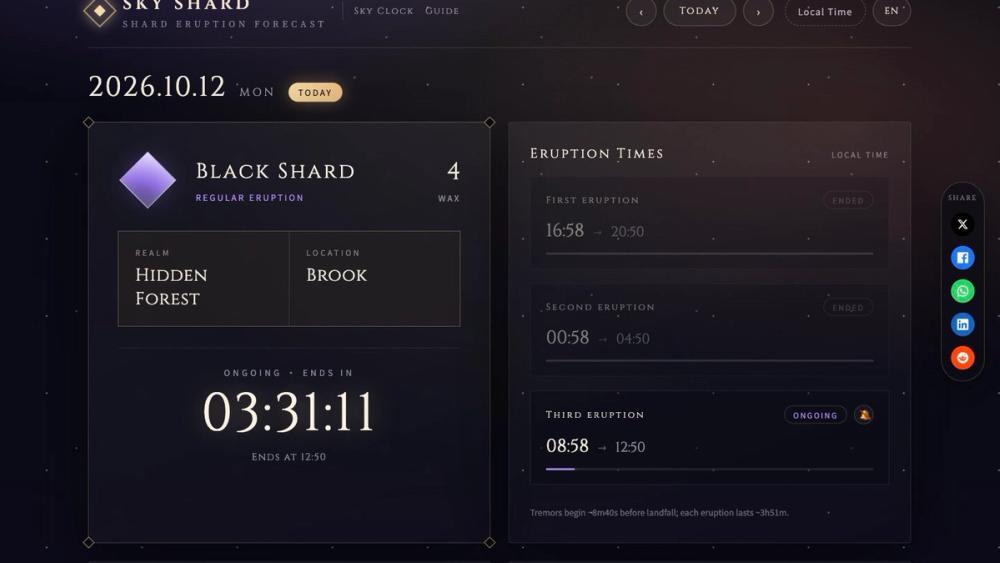
Sky Shard (skyshard.day) is a free, browser-based tracker for Shard Eruptions in Sky: Children of the Light. When the page loads, it shows whether a shard erupts today, which realm and exact location it lands in, whether it is a red or black shard, what it rewards, and a live countdown to the next landing or to the end of the current eruption.
Shard Eruptions are a recurring event in Sky. A crystal shard falls into one of the game's five realms (Daylight Prairie, Hidden Forest, Valley of Triumph, Golden Wasteland or Vault of Knowledge), and players who collect pieces of it before it closes earn Wax or Ascended Candles. The game itself gives only a warning sign at the realm gate, so players often check community Discords or spreadsheets to find out where the shard is. Sky Shard puts that information on one page.
The schedule follows a fixed pattern tied to the day of the month in Sky time (America/Los_Angeles). Odd days run the red-shard groups, even days run the black-shard groups, and a rotation decides the realm. thatgamecompany has never published this pattern; the Sky community worked it out and verified it over time. Sky Shard computes the schedule live in the browser instead of fetching it from a server.
Sky Shard is an unofficial, fan-made project. It is not affiliated with, endorsed by, or connected to thatgamecompany.
Key Features
- Today's shard at a glance. The top of the page shows the realm, the specific location, the shard type (black "Regular Eruption" or red "Strong Eruption") and the reward: Wax for black shards, Ascended Candles for red shards.
- Live countdown. A ticking timer shows "Lands in" before the next eruption and "Ongoing · ends in" while one is open. Once all of the day's eruptions are over, the page says so.
- Eruption time list. Each of the day's three eruptions is listed with a status label (Upcoming, Ongoing or Ended) and its end time.
- No-shard days handled. Each of the five schedule groups skips two fixed weekdays. On those days the tracker shows "No Shard Eruption" instead of a wrong guess.
- Local time or Sky time. Countdowns and times show in your device's local timezone by default. A timezone button switches the display to Sky time (America/Los_Angeles, including daylight saving changes).
- Day picker and 7-day strip. You can look ahead at any day's schedule. A "Next Seven Days" strip summarizes the coming week.
- Monthly shard calendar. A month view marks red shard days, black shard days and no-shard days. You can move between months, and clicking a day jumps the main display to it.
- Browser notifications. Optional bell buttons send a browser notification when an eruption lands and at the daily and weekly resets. They use the browser's native notification permission and only fire while the tab stays open.
- Daily and weekly reset timers. Countdowns to the daily reset (00:00 Sky time) and the weekly Eye of Eden reset (Sunday 00:00 Sky time).
- Traveling Spirit panel. Shows whether a Traveling Spirit is visiting and when it departs. The site notes that these dates are entered by hand, because thatgamecompany picks each visitor rather than following a predictable pattern.
- English and French. The interface is available in both languages.
- Sky Clock page. A separate page at /sky-clock counts down to the recurring social-light events: Geyser in Sanctuary Islands, Grandma's Dinner in the Elevated Clearing of Hidden Forest, and the Sunset Turtle, plus the daily and weekly resets.
- Guides. A blog section covers red vs. black shards (with a reward table by realm), how to catch a shard eruption, the Traveling Spirit schedule, daily and weekly resets, the five realms, Wax vs. Ascended Candles, Eye of Eden, all Sky seasons in order, and elder vs. seasonal spirit mask prices.